Web Product Scraper

Magento product scraper:
category pages to Excel, images included.

Open a Magento category page, click the icon, and Web Product Scraper lists its products as a table. Let it open the product pages for the SKU, the full description and the gallery at full size, then export Excel, CSV or JSON, or one ZIP with a folder per product. Free, no account, nothing leaves your browser.

Add to Chrome, it's free No account · no server · nothing leaves your browser
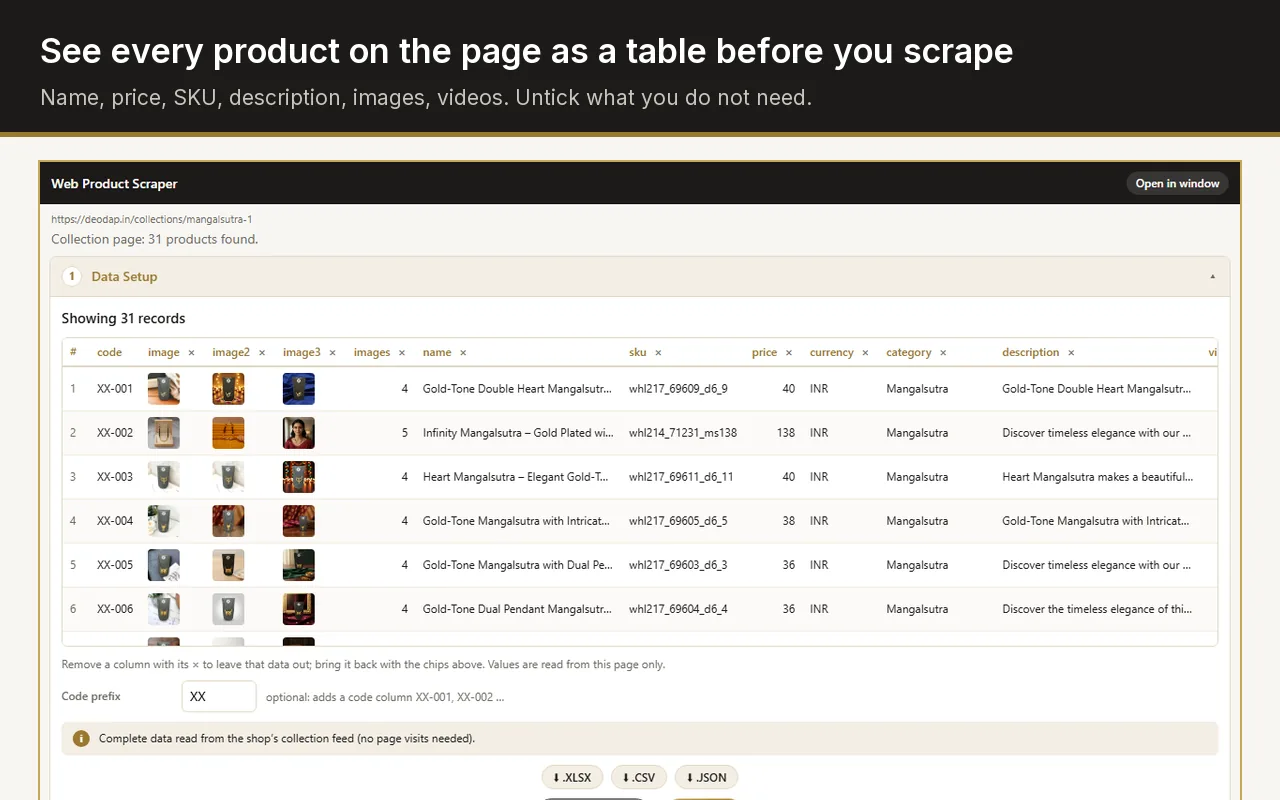
Web Product Scraper sidebar beside a shop category page, showing the products as a table with image, name and price columns

How do I export products from a Magento store to Excel or CSV?

Open a category page of the Magento store with Web Product Scraper installed, click the icon, and download the list as Excel or CSV. Tick "Open every product page" first when you also need SKUs, full descriptions and the full-size gallery. The special price and the struck-out regular price come out as two separate columns.

  1. Add Web Product Scraper to Chrome. It is free and needs no account.
  2. Open a category or search page of the Magento store.
  3. Click the extension icon. The side panel shows the products as a table.
  4. Choose the pages to read, and tick "Open every product page" for SKUs, descriptions and full-size photos.
  5. Press Start scraping, then download Excel, CSV or JSON, or the ZIP with every photo.

Exporting your own store, or someone else's?

Your own store: use the Magento admin

You do not need this extension. In the Magento 2 admin, open System, then Data Transfer, then Export, choose Products as the entity type and CSV as the format. That file holds every attribute and every product, in the format Magento imports.

Someone else's store: use this

A supplier, a wholesaler, or a public catalogue you are allowed to use, where you have no admin access. Open one of its category pages and export it, with no account on that store.

Photos in folders, either way

The admin export lists image file names, not the images. The ZIP here saves every photo in a folder per product, named after it.

Not an import file

The CSV here is a plain product table, not Magento's import format. Map its columns when you import it anywhere.

What you get from a Magento store

The category page gives the list; the product pages give the details.

Name and product URL

Read from the product grid of the category page, so the list is complete before any product page is opened.

Special price and regular price

When a Magento product is on sale, the page shows the special price and a struck-out regular price. Both are read: the special price as the price, the regular price as the MRP column.

SKU, brand and description

From the product page: the SKU line, the brand when the shop shows a manufacturer or brand attribute, and the full description as text.

Category from the breadcrumb

The category the product sits in, taken from the breadcrumb trail above the product.

The gallery at full size

Magento puts the gallery's image list in the product page itself. The extension reads that list and takes the full-size files, not the resized copies the theme displays.

Your own codes

Type a prefix such as XX and every product gets a code: XX-001, XX-002, in page order.

How it works on Magento

Four steps in the Chrome side panel, while you look at the store.

Open a category page

A category, a search result or any page that lists products in Magento's product grid. The panel shows how many products it found and the table.

Choose the data

Remove the columns you do not need with one click. Add a code prefix if you want product codes.

Choose the pages

Magento pages a category with ?p=2, ?p=3 and so on. Set "from page 1 to page N" and the run reads exactly those pages, with a pause between them.

Follow the product pages, then export

Tick "Open every product page" for the SKU, the description and the full-size gallery. Pages open a few at a time in one collapsed tab group, which is closed when the run ends. Then download Excel, CSV, JSON or the ZIP.

Built for the way Magento pages are made

Magento 2 storefronts share the same building blocks under their themes: a product grid on category pages, a price box that holds the final price and, on a sale, the old price, and product pages that carry their gallery as data inside the page. Web Product Scraper has a Magento reader that knows these blocks, so it takes the right price on a sale, skips the cart buttons, and finds each photo at full size.

Stores with a heavily customised or headless front end can lay their pages out differently. When a value is read wrong, "Teach this site" fixes it in a minute: press Pick next to a field, click the right value on the page, and save it as a profile for that shop. It is used on every page of the shop, including the product pages a run opens.

A single product page is handled as one product, with its own photos ticked, and the related, up-sell and cross-sell blocks are never included.

What people use it for

Supplier catalogues

Scrape a wholesaler's Magento category, keep the columns you need, add your codes, and get every photo in a folder named after the product.

Leaving Magento

Export the products of a store you are moving away from, with names, prices, SKUs, descriptions and full-size images, and import the CSV on the new platform.

Price lists

Export the special and regular prices of a category to Excel, and run it again later: products already in your list are skipped, so only new ones are added.

Compared with Magento export tools

Most Magento export tools are extensions installed on the store itself, so they need the owner's admin access. Web Product Scraper works from the outside, on the public pages you open in Chrome, and sends nothing anywhere. It also keeps working when the next supplier runs Shopify, WooCommerce, BigCommerce or a custom shop, with the same four steps and exports.

It is free without a paid tier: no watermark, no sign-up, nothing locked behind payment. Each run reads up to 500 pages and collects as many products as you set. Site access is requested per shop, only when you start a run there.

Frequently asked questions

Does it read configurable products?

The table holds one row per product, with the price the page shows and the SKU of the product page. Rows for each size or colour of a configurable product are not exported at the moment.

Does it work on Magento 1 or Adobe Commerce?

Adobe Commerce storefronts are Magento 2 underneath and are read the same way. Magento 1 reached its end of life in 2020; on the few shops still running it the extension falls back to its general product reader, and "Teach this site" covers the rest.

How many product pages does it open at once?

You choose, between 1 and 10, with a pause between page loads. Three is a safe choice; some shops behind a firewall start refusing at five or more.

Is scraping a Magento store allowed?

You are responsible for how you use the data. Read the store's terms, take only what you need, and keep the default pauses; the extension reads only pages you open yourself and stops if a site starts refusing.

Add to Chrome, it's free