
Nothing to install
It lives in Chrome's side panel next to the shop you are looking at. No desktop app, no sign-up, no task to design before the first export.
Octoparse is a desktop app for scraping almost any website, with cloud runs, scheduling and templates on its paid plans. Web Product Scraper is a free Chrome extension that does one job: it reads a shop's products, with price, list price, SKU and every photo, and gives you Excel, CSV and JSON plus one ZIP with a folder per product. Here is an honest comparison, so you can pick the right tool.
Add to Chrome, it's free No account · no server · nothing leaves your browser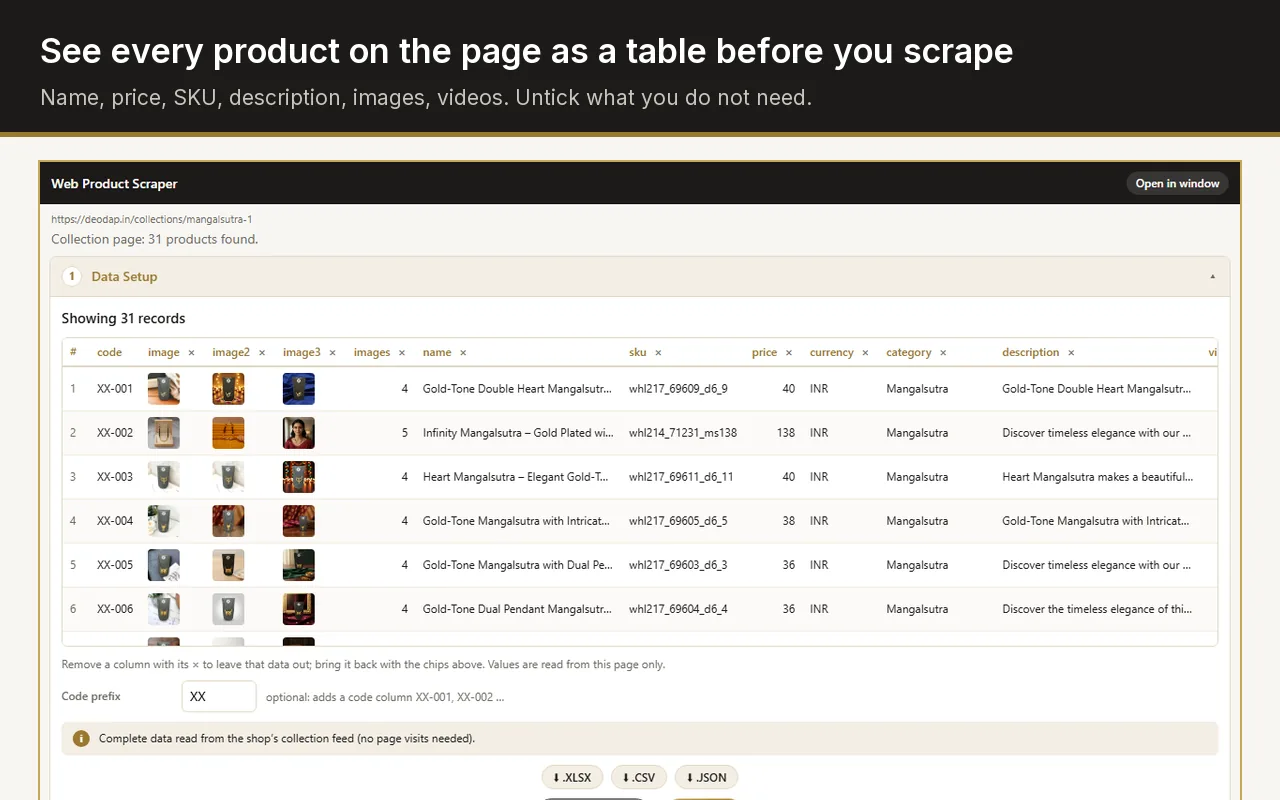
Octoparse itself is a desktop app for Windows and Mac, not a Chrome extension. If the pages you need are a shop's products, Web Product Scraper runs inside Chrome's side panel, is free with no paid tier and no account, and saves every product photo in a folder per product. For scraping any kind of website on a schedule or in the cloud, Octoparse remains the stronger tool.
Checked on 28 September 2026 against Octoparse's own pricing and download pages. "Not stated" means those pages do not say.
| Web Product Scraper | Octoparse | |
|---|---|---|
| What it is | A Chrome extension in the side panel | A desktop app for Windows 10 (64-bit) or later and Mac |
| Price | Free, no paid tier | Free plan; Standard from $69 a month and Professional $249 a month, billed yearly |
| Free limits | Up to 500 pages per run, as many products as you set | 10 tasks, 1 device, local runs only; 50,000 rows a month, up to 10,000 per export |
| What it scrapes | Shop products: name, price, list price, SKU, brand, description, photos, videos | Any website, with auto-detect, workflows you build, and 500+ templates on the Standard plan |
| Cloud runs and scheduling | No, it runs in your Chrome while you watch | Yes, on paid plans |
| Export formats | Excel, CSV, JSON | Excel, CSV, JSON, HTML, XML; databases, Google Sheets and cloud storage depending on the plan |
| Photos saved as files | One ZIP, a folder per product | Not stated |
| Blocking and CAPTCHAs | Pauses between pages and stops if a site refuses | IP rotation, residential proxies and CAPTCHA solving on paid plans |
| Data stays on your computer | Yes, nothing is sent anywhere | Local runs stay local; cloud runs use Octoparse's servers |
Use Octoparse when the job is bigger than one shop's catalogue: any kind of website, runs that repeat on a schedule, extraction in the cloud while your computer is off, an API, or data going straight into a database. Its free plan covers small projects on one computer, and the paid plans from $69 a month add the cloud, scheduling and anti-blocking tools.
Use Web Product Scraper when the pages are a shop's products and you want the result now, inside the browser you already use: one row per product with price and list price, your own codes such as XX-001, and one ZIP with every image and video in a folder named after each product. There is nothing to install beyond Chrome, no account and no plan to upgrade.
Shopify collections are read straight from the store's product feed, so a collection is done in seconds; WooCommerce, Magento and BigCommerce shops have their own readers, and "Teach this site" handles the rest.
It lives in Chrome's side panel next to the shop you are looking at. No desktop app, no sign-up, no task to design before the first export.
Every image and video at full size, in one ZIP with a folder per product and the spreadsheet beside them.
A struck-out price, a compare-at price or an "M.R.P." label becomes its own column, so sale prices are never mixed up.
When a shop is read wrongly, press Pick and click the right value once; the rule is saved for that site.
Octoparse is installed as a desktop app for Windows or Mac; its Chrome mode drives the Chrome browser on your computer from that app. Web Product Scraper is installed from the Chrome Web Store and runs inside Chrome itself.
Yes. There is no account and no paid tier. Each run reads up to 500 pages and collects as many products as you set (100 by default); run it again to add more.
No. It runs when you press Start, in your own browser, on the pages you open. For scheduled or cloud runs, a tool such as Octoparse's paid plans fits better.
Nowhere. The list stays in your browser until you export it or clear it, and the extension talks to no server of its own.