
Shopify
Collections are read from the store's own product feed, so a whole collection is exported in seconds without opening a product page.
Web Product Scraper is an ecommerce website scraper that lives in Chrome's side panel. Open a shop's category, search or product page, and it reads the products as a table: name, price, list price, SKU, brand, description, photos and videos. Choose the pages, then export Excel, CSV or JSON, or one ZIP with a folder of photos per product. Free, no code, no account, nothing leaves your browser.
Add to Chrome, it's free No account · no server · nothing leaves your browser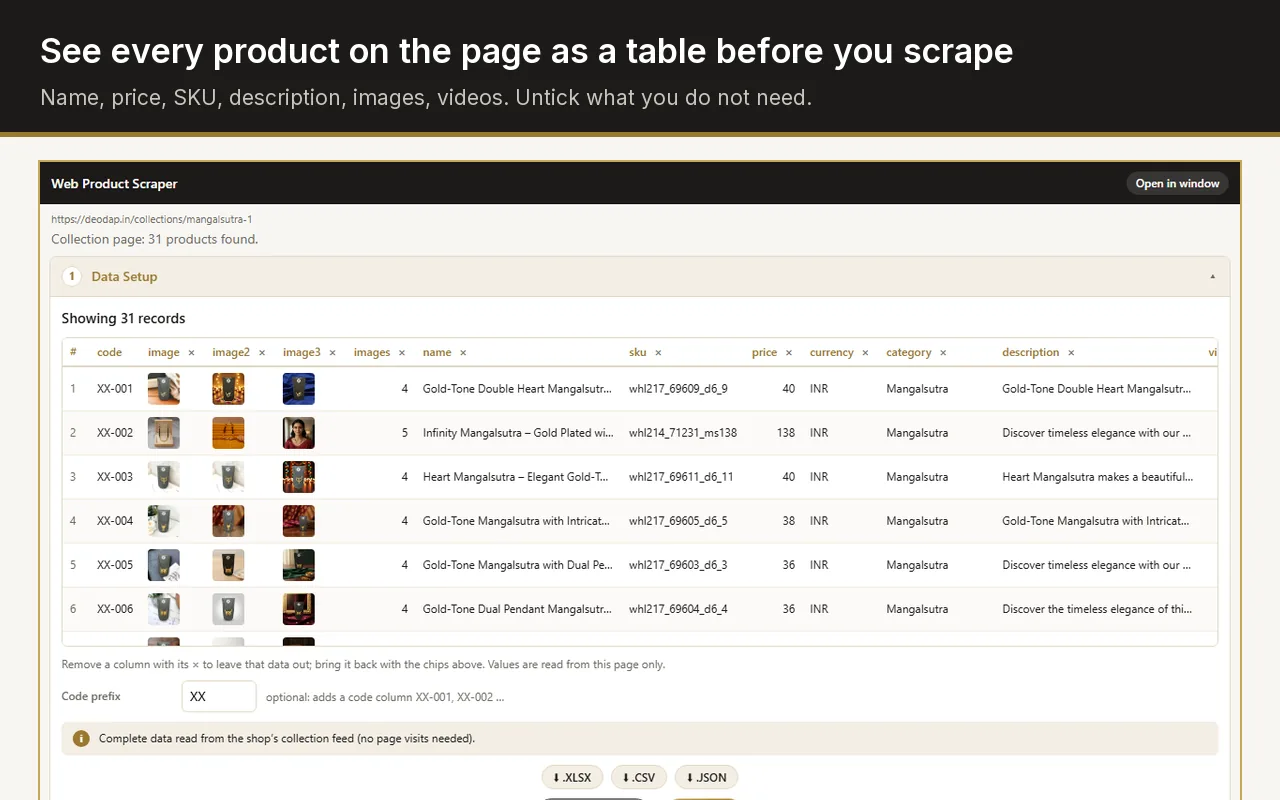
Install a product scraper in your browser, open the page of the shop that lists the products, and export them. With Web Product Scraper that takes five steps and no code: the side panel recognises the products on the page, you choose the columns and the pages, and it saves Excel, CSV or JSON, plus a ZIP with every product photo when you want the images too.
A reader for each of the big shop platforms, and a general reader for the rest.
Collections are read from the store's own product feed, so a whole collection is exported in seconds without opening a product page.
Shop and category pages, with the sale price and the struck-out regular price as separate columns, and SKUs from the product pages.
Magento 2 category grids and product pages, including the gallery at full size and the special and regular price.
Product pages with SKU, price and RRP, brand, category and the full-size gallery.
Most shops publish their products as structured data in the page, and list them as product cards. The general reader uses both.
Press Pick next to a field and click the right value on the page once. "Teach this site" saves it as a rule for that shop.
The list of products, with the price and photo each card shows.
A shop's own search page works like a category: brand, price and list price are read from every card.
One product with its full gallery, and the "you may also like" products left out.
Set "from page 1 to page N" and the run follows the pages, with a pause between them.
For shops that add products as you scroll or press "Load more", the run does the scrolling and pressing for you, a set number of times.
A product that appears on two pages, or again in a later run, is kept once. Running again adds only the new products.
One row per product, with the columns you keep.
The product title and its address, so every row can be traced back to the shop.
The selling price and, when the shop shows one, the struck-out, compare-at or "M.R.P." price as a separate column, with the currency.
Read from the product page or the shop's product data when it publishes them.
The full product description as plain text, from the product page.
Every image at full size, and product videos, as links in the table and as files in the ZIP.
Type a prefix such as XX and every product gets a code: XX-001, XX-002, in page order.
You stay on the shop while you set it up, and see the table before you scrape anything.
The panel shows the products it found on the page as a table. Remove columns with one click and add a code prefix.
Choose the page range, how far to scroll and how many times to press Load more.
Tick "Open every product page" for descriptions, SKUs and full galleries. Pages open a few at a time in one collapsed tab group.
Watch the progress, stop at any time, and download Excel, CSV, JSON or the ZIP of photos when it is done.
Copying by hand works for ten products and falls apart at a hundred: names, prices and photos have to be copied one by one, and every photo saved and renamed.
General table scrapers turn any list on a page into rows. They are free and quick, but they do not know which number is the price and which is the struck-out price, and they do not save the photos as files.
Desktop apps and cloud services scrape almost any website, on a schedule and at scale, with proxies and APIs. They need an account, often a paid plan, and a task to design before the first export.
A product scraper in the browser, like this one, sits between them: it knows what a product, a price and a gallery are, needs no code and no account, and saves the photos in a folder per product. It runs while you watch, on pages you open yourself, so it is not meant for scheduled crawling of whole marketplaces.
Sizes and colours are not separate rows; the row holds the price the page shows.
It reads only the shop you have open and the pages a run follows from it, never a list of sites in the background.
Each run reads up to 500 listing pages and collects as many products as you set (100 by default). Run it again to add more.
It pauses between page loads and stops when a site starts refusing. Read each shop's terms and take only what you need.
Turn a wholesaler's website into a spreadsheet with your own product codes and a folder of photos per product, ready for your store or a WhatsApp catalogue.
Export prices and list prices for a category, and run it again later to add only the new products.
Export names, prices, SKUs, descriptions and full-size images from the old site, and import the CSV on the new platform.
Reading public product pages is common, but each shop sets its own terms, and some forbid automated collection. You are responsible for how you use the data: read the terms, take only what you need, and keep the default pauses.
No. Everything happens in the side panel: the products appear as a table, you remove columns with a click, and you press Start scraping.
Yes. It reads the page as Chrome shows it, after the shop's scripts have run, and the product pages it opens are real Chrome tabs.
Yes, with no paid tier and no account. Each run reads up to 500 pages and collects as many products as you set; run it again to add more.