
How many
Step 2 offers 10, 50, 100 or All reviews per product. All stops at 500 per product.
Version 1.13.0 is live on the Chrome Web Store. The three releases since 1.10 add two things: the reviews of the products you scrape, with the photos customers added, and optional AI tags. This post covers 1.11, 1.12 and 1.13 together.
Add to Chrome, it's free No account · private by default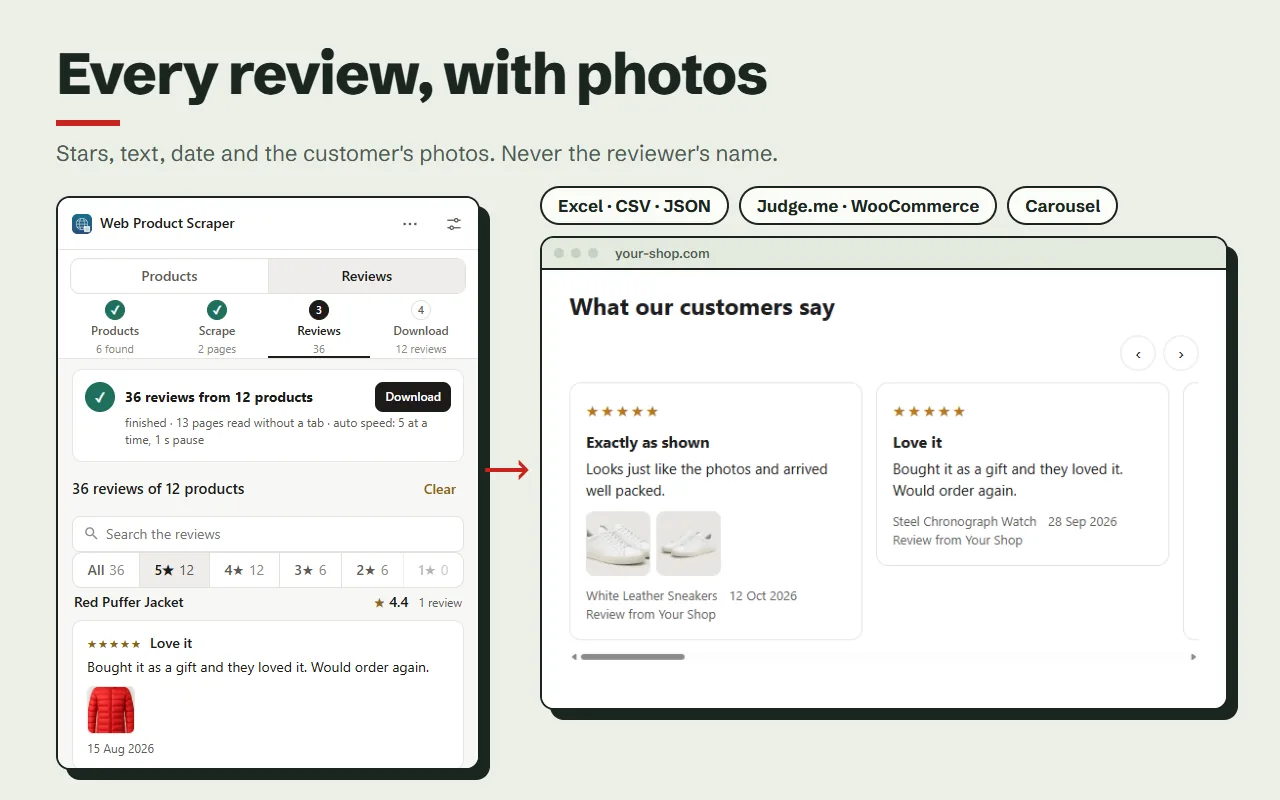
The side panel can now read each product's reviews instead of the products, with customer photos, and save them as files or a review carousel. If you turn it on, AI also suggests a category, tags and SEO keywords for each product.
Step 2 offers 10, 50, 100 or All reviews per product. All stops at 500 per product.
Each product page first, then the shop's own review pages on Flipkart, Myntra, WooCommerce shops and Shopify shops that use Judge.me. On Amazon the panel opens the product's all-reviews page in your tab and presses its Show more reviews button; Amazon may ask you to sign in there.
Its stars, title, text and date, whether the shop marks it as a verified purchase, and the links of any photos the customer added. The reviewer's name is never read.
Reviews sit under their product with its rating. Filter by stars or search the text; the downloads hold what step 3 shows.
Excel, CSV or JSON with one row per review, a Judge.me import file for a Shopify store, a WooCommerce product reviews file, or a review carousel to paste into any website. Or press Copy reviews.
They are shown from where the shop keeps them, and saved only when you make the photo ZIP, in a reviews folder.
A collection under a country address, such as /en-ca/collections/, comes from that market's product feed, at its prices.
A "-scaled" photo is no longer saved twice.
A Myntra product page gives its reviews, rating and number of ratings, and more reviews come from Myntra's review pages, 12 at a time.
The catalogue website made in step 4 shows each product's reviews.
Ratings and the MRP are read more reliably.
There is still no paid tier and no sign-up. AI tags are free too, up to 300 products a day.
Versions 1.11 to 1.13 ask for no new permission. Site access is still asked for per site, only when you start a run there.
Reviews stay in your browser, like products, until you download or clear them. Two things reach a server: AI tags, when you tick them, and on shops that use Judge.me, a request to Judge.me's public review service with the shop's address and the product's ID only.